
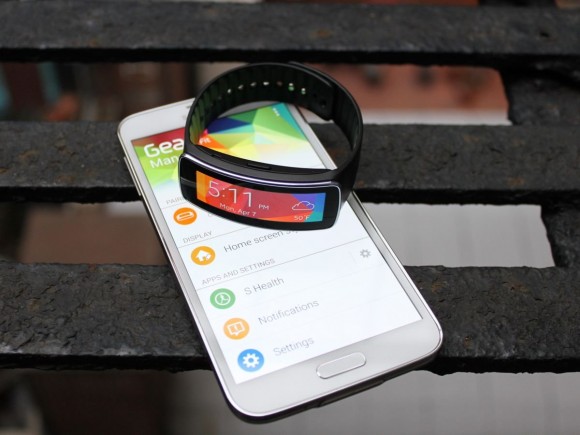
After releasing a critical dud last fall with its first major smartwatch release, the Galaxy Gear, Samsung surprised a lot of folks in the industry when it announced an attractive new entrant into the wearable computing category, the Gear Fit, just a few months later.
The Gear Fit, as the name implies, is a fitness-tracking device. But unlike its biggest competitors such as the Fitbit, Nike FuelBand and Jawbone Up, the Gear Fit comes with a twist. It has a brilliant curved touchscreen so the device can double as a smartwatch, delivering notifications from your smartphone to your wrist. It’s a strikingly pretty device, and one of the most intriguing wearables I’ve seen so far.
I’ve been testing the Gear Fit along with Samsung’s new flagship phone, the Galaxy S5, for a little over a week. It’s far from a perfect device, but I think it does point us in the right direction of what smartwatches could be like if they ever become as mainstream as smartphones.
The Gear Fit launches April 11 along with the Galaxy S5. It’ll cost $199.
How It Works
The Gear Fit connects to your phone using Bluetooth and a special app called the Gear Fit Manager, which you have to download separately from the Google Play store for Android apps. It’ll only sync with Samsung’s Galaxy line of smartphones and tablets, so other Android phone users are out of luck.
The device itself is a pill-shaped mini computer with a bright, eye-catching 1.84-inch color touchscreen. It pops into a rubbery band that comes in a variety of colors so you can customize it whenever you want. It’s incredibly light — just 27 grams — and largely mimics the feel of other popular fitness-tracking bands.
After pairing the Gear Fit to your phone, you can use it to track your steps with a built-in pedometer, measure your heart rate, and display notifications like incoming calls, texts, emails and tweets from the apps installed on your smartphone. The health data syncs with Samsung’s fitness app called S Health, which comes preinstalled on Galaxy phones and tablets. S Health helps you get a broad overview of your calories burned, average pulse, and other activities. You manage the other functions like incoming notifications and software updates using the Gear Fit Manager app on your phone.
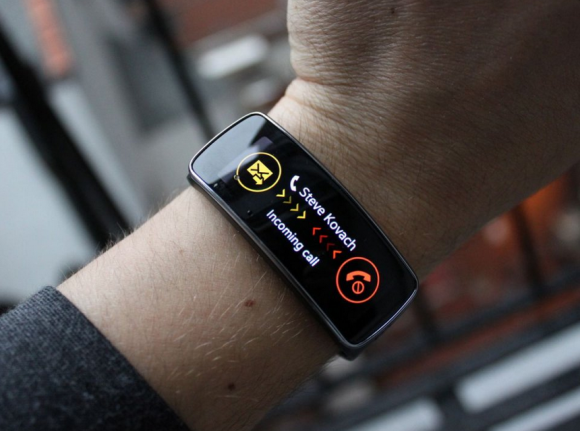
Whenever you get a new notification, the Gear Fit displays the text on the screen. You can tap a button to launch the corresponding app on your phone, or delete the notification and view it later. For incoming calls and texts, you can use the Gear Fit Manager to preprogram a few common responses like “I can’t talk now…I’m in a meeting” so you don’t have to pull out your phone. But for everything else, you’ll need your phone to respond to incoming notifications.
An incoming call notification on the Gear Fit.
 Steve Kovach/Business Insider
For fitness, the Gear Fit takes the goals you put into S Health to prompt you as you exercise. If you want to burn 500 calories during a run for example, the Gear Fit can tell you to run faster or slow down so you reach your goal.
The device is also water resistant, so you won’t have to worry about breaking it if you sweat or get it a little wet when washing your hands.
Click here to see the most important features of the Gear Fit >>
What It’s Like
You can think of the Gear Fit as a stripped-down version of last year’s Galaxy Gear smartwatch. (Samsung has a new version of the Galaxy Gear, the Gear 2, that will launch the same day as the Fit.) The Gear Fit is more focused, beautiful and functional than the regular Gear line, which seems to be packed with a lot of unnecessary extras like a camera, universal remote control, and third-party apps. Instead, the Gear Fit concentrates on what’s important: monitoring your fitness and displaying the notifications from your phone. I think that’s a much more logical solution for a wearable device.
The Gear Fit is also light and comfortable to wear thanks to its rubbery, flexible band and curved display that matches the contour of your wrist. It’s more like a Fitbit or Nike FuelBand than the current generation of bulky smartwatches. With the Gear Fit, you won’t look like a super geek wearing a wrist-computer from the future. The Gear Fit’s design blends right in, yet still includes the added benefit of an attractive color display.
And don’t let it turn you off that the Gear Fit can’t do as much as its big brother the Gear 2. Wearable computing is still in its infancy, and we’re seeing too may companies — Samsung included— trying to shrink the smartphone down to a wearable size. But all those features and apps get in the way. A good wearable should be there when you need it and then disappear. The Gear Fit comes very close to that experience.
 Steve Kovach/Business Insider
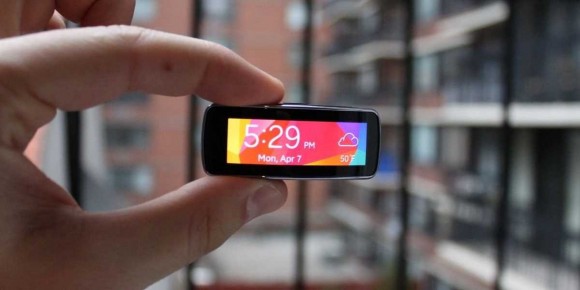
The display is very attractive, too. It’s bright, colorful and responds well to touch. You swipe left and right to navigate, and tap on icons to launch features like the heart rate monitor, pedometer and notification viewer. There are also a variety of different home screen watch faces and wallpapers to choose from, including a really handy one that shows you the current weather along with the time.
Even with that color display and small body, I was able to get really good battery life out of the Gear Fit: usually four days. I was very impressed that the Gear Fit was able to last so long, even with the power-sucking screen. The last thing anyone wants to do is charge their watch as often as their phone.
One Big Flaw
But all that beauty and focus doesn’t necessarily translate well to this form factor. Because of the widescreen orientation, the Gear Fit is incredibly funky to use when you strap it on your wrist. When you look at it like a normal watch, the display is perpendicular to your vision, meaning you have to twist your head or arm around in order to read it. It’s a frustrating experience. I found it best if I stuck my arm out and away from my body and looked at the screen from a distance, but that still wasn’t ideal. If I’m going to wear a watch, I want to be able to read it as easily as one. The Gear Fit doesn’t let me do that.
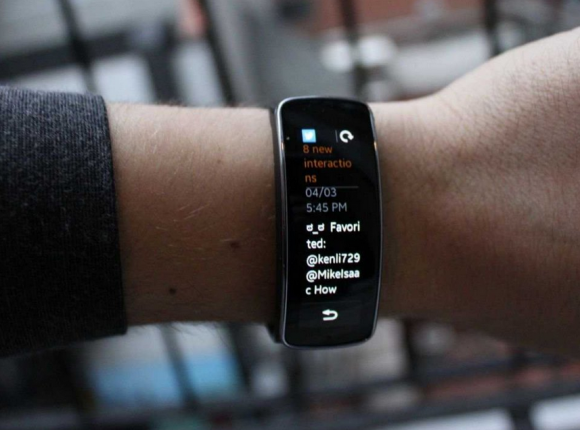
Samsung did add a software update late in my testing that lets you switch the interface to a vertical orientation instead. I only got to spend a few minutes with that version of the software, but it does feel much more natural. But because the screen is so narrow, text from notifications look squished to just a few characters per line so you’-re re-adi-ing som-e wor-ds lik-e thi-s. It’s better, but still not perfect.
The vertical orientation makes notifications look squished.
 Steve Kovach/Business Insider
I think Samsung has come close to the answer of what a smartwatch should be able to do and look like with the Gear Fit, but we’re not quite there yet. And to be clear, I think this is more of a software issue than a hardware issue. The design and technology are there, but Samsung hasn’t figured out how to make the Gear Fit really sing.
Conclusion
The common narrative in consumer gadgets these days is that wearable gizmos like the Gear Fit will be one of the next big computing platforms. But when you look at the current state of these devices, it’s pretty clear there’s a lot of work to do. No one has nailed it.
Still, the Gear Fit inches us closer. It’s a beautiful representation of what the future of wearable computing might be like one day. But it’s still missing some unknown element that makes me think it’s a must-have companion for your smartphone. Getting notifications on your wrist is nice, but you still have to depend on your phone if you want to take action on most of them. That makes it difficult to justify spending another $199 on top of the $200+ you just spent on a Galaxy phone.
If you have a Samsung Galaxy phone and really want a smartwatch, the Gear Fit is your best choice. But most people should probably wait until something better comes along.

 An early version of Samsung’s next Galaxy phone might have just leaked
 Japan’s new Hello Kitty and Sanrio smartwatches are cutewatches too【Photos】
 Here’s an easy way to check if the new iPhone 6 and iPhone 6 Plus will fit in your pocket
 SmartBoy gadget lets you relive your favorite childhood games on your smartphone
 Sony announces mammoth 6.5-inch smart phone: the Xperia Z Ultra
 Lawson convenience store at popular tourist site is one of the most unusual in Japan
 Japanese trains in Sapporo might be better than those in Tokyo, thanks to one special feature
 Super Sound Yobikumi-kun Mini poised to be the hottest Japanese Christmas gift of the year
 Tokyo Metro adds platform display showing where least crowded parts of the next train will be
 How to easily make Salmon & Cheese Grilled Rice Balls, a tasty camp food【SoraKitchen】
 Create a tiny Ghibli anime world on your bookshelf with new miniature papercraft art kits
 Tiny house by Muji finally goes on sale in Japan
 Foreign tourists in Japan will get free Shinkansen tickets to promote regional tourism
 Japan’s budget chain restaurant Saizeriya might just be the perfect first date location
 Japanese government says country needs more women’s room toilets to meet modern society’s needs
 Japan reportedly adding Japanese language skill requirement to most common foreigner work visa
 Mt. Fuji decorated with a 500,000-flower pink carpet is Japan’s ultimate spring view
 Pokémon and Ikea Japan cross over into each other’s worlds with collaboration events
 Starbucks Japan closing only Shinkansen platform branch for popularity-triggered renovations
 You can assemble a well-balanced team of Pokémon, them eat them, thanks to Japanese cake chain
 30 Pikachus want to share a Tokyo hotel room with you that has separate Grass, Water, Fire spaces
 Man bites woman at cherry blossom park in Japan, dies shortly after
 7-Eleven Japan’s new baked-in-store sweet treat is only available in three parts of the country
 Peanuts and Coke becomes a viral hit in Japan, but is it a trend worth joining?
 Japan now has a special desk for people who work at home with a pet cat[Photos]
 Famous Tokyo cherry blossom spot installs view-blocking screens to fight overcrowding[Video]
 Uniqlo announces new T-shirts for One Piece, Naruto and more for manga publisher’s 100th birthday
 Train station platform ramen store closes its doors on half a century of history in Tokyo
 Starbucks Japan releases new My Fruit³ Frappuccino at only 34 stores around the country
 Krispy Kreme releases Super Mario doughnuts in Japan for a limited time
 Japanese onsen egg maker from 100-yen store Daiso needs to be on your shopping list
 Survey asks foreign tourists what bothered them in Japan, more than half gave same answer
 Japan’s human washing machines will go on sale to general public, demos to be held in Tokyo
 Starbucks Japan releases new drinkware and goods for Valentine’s Day
 We deeply regret going into this tunnel on our walk in the mountains of Japan
 Starbucks Japan releases new sakura goods and drinkware for cherry blossom season 2026
 Studio Ghibli releases Kodama forest spirits from Princess Mononoke to light up your home
 Japan’s newest Shinkansen has no seats…or passengers [Video]
 Major Japanese hotel chain says reservations via overseas booking sites may not be valid
 Put sesame oil in your coffee? Japanese maker says it’s the best way to start your day【Taste test】
 No more using real katana for tourism activities, Japan’s National Police Agency says
 We test out Japanese megastore Don Quijote’s new mega-affordable smart watch
 Curved screens and bendable batteries: Say hello to the gadgets of the not-so-distant future!
 China’s latest smartphone pushes the boundaries of innovation with its direct plug-in connectivity
 JINS MEME: Award winning glasses track your physical state and concentration levels
 Hacka Doll: “Otaku” news beamed right to your phone like anime magic! 【Review】
 Are Daiso’s smartphone VR goggles worth breaking the 100-yen barrier?